Cleaning up a CMS installation while keeping recovery points
Northstar Studio has installed several CMS updates. Its operator opens Backups and finds more archives than expected: the policy says to keep the latest five successful pre-update backups, yet older files remain.
The setting describes a minimum number of recovery points. Other archives may still be within their retention period, explicitly protected or needed by another safeguard. WebBlocks CMS brings these decisions into Maintenance → Cleanup, where an operator can inspect storage, review retention and choose which maintenance categories to automate.
Read age and minimum count together
A backup must pass the applicable age and protection checks before policy cleanup can remove it. An old archive can stay because it is still needed to preserve the minimum successful count. A failed or missing archive cannot take the place of a validated recovery point.
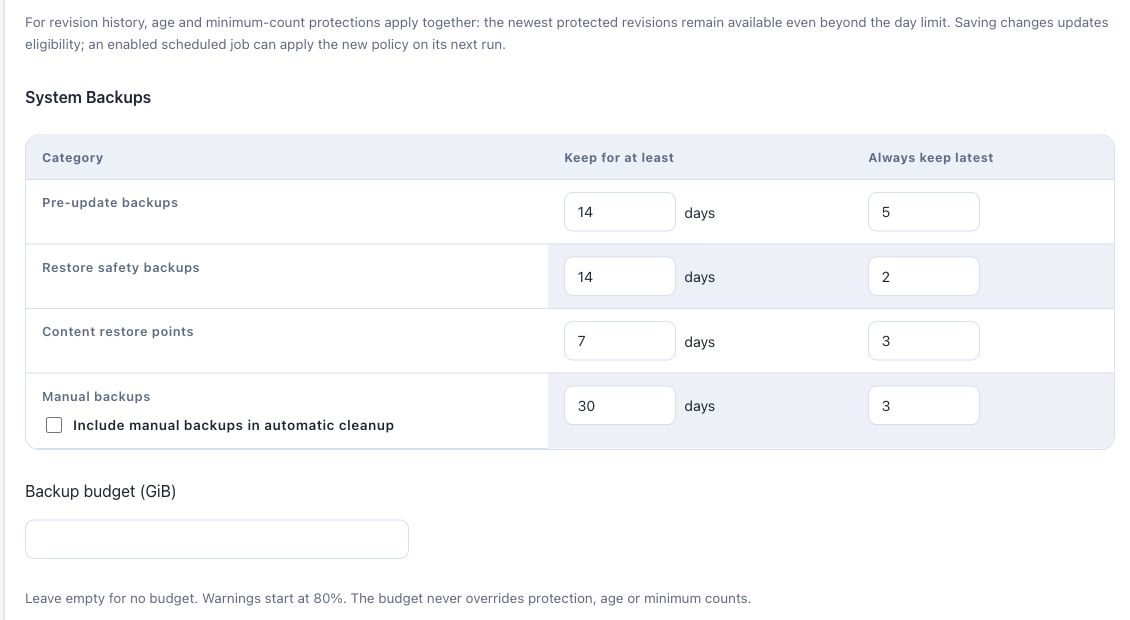
Consider an illustrative policy with a 14-day age threshold and five protected successful archives. If only three valid archives exist and all are older than 14 days, their age alone does not make them disposable. The minimum count still protects them. If there are ten valid archives, several may remain because they are recent even after the oldest five are no longer needed by the count rule.
Existing saved settings survive an upgrade. Review the installation's actual policy before relying on a product default.
Inspect why storage is being retained
The storage explanation separates backup records, distinct physical files and measured bytes by retention reason. A shared archive contributes physical storage once, even if more than one record refers to it. Files that are not registered as backups still count toward measured usage, but automatic backup cleanup does not select them for deletion.
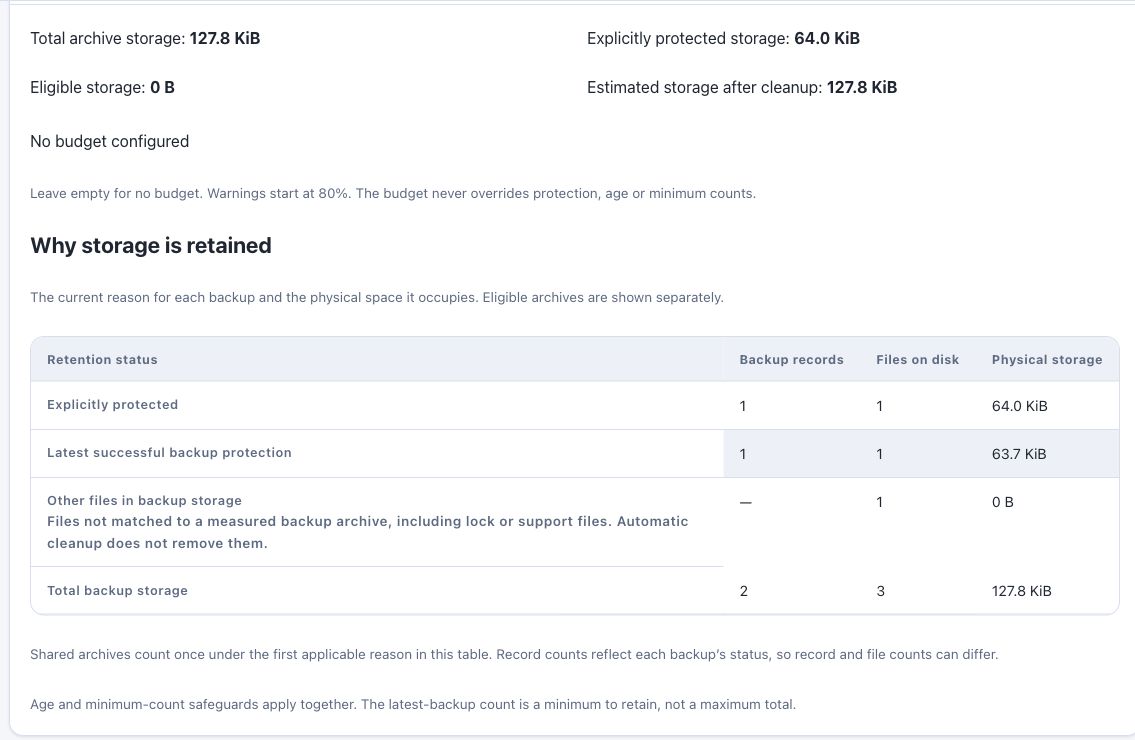
An optional storage budget warns about usage. It does not override recovery protection or turn retention into a hard storage cap. If cleanup leaves the installation over budget, the operator still needs to decide how to address that storage pressure.
Distinguish protection from indefinite retention
The Backups controls let an operator mark an archive Protected and select retention behavior. Protection blocks deletion until it is removed. Indefinite retention keeps an archive from automatic expiration, while still permitting an explicit deletion.
This distinction is useful for Northstar's pre-migration backup: the operator can deliberately protect it rather than assume that an indefinite date also prevents every manual removal. An explicit expiration date still respects protection and minimum recovery counts.
Enable maintenance categories separately
Cleanup also covers asset revisions, obsolete media variants, known temporary workspaces, page revisions and Shared Slot revisions. New automatic maintenance categories start disabled and can be enabled individually.
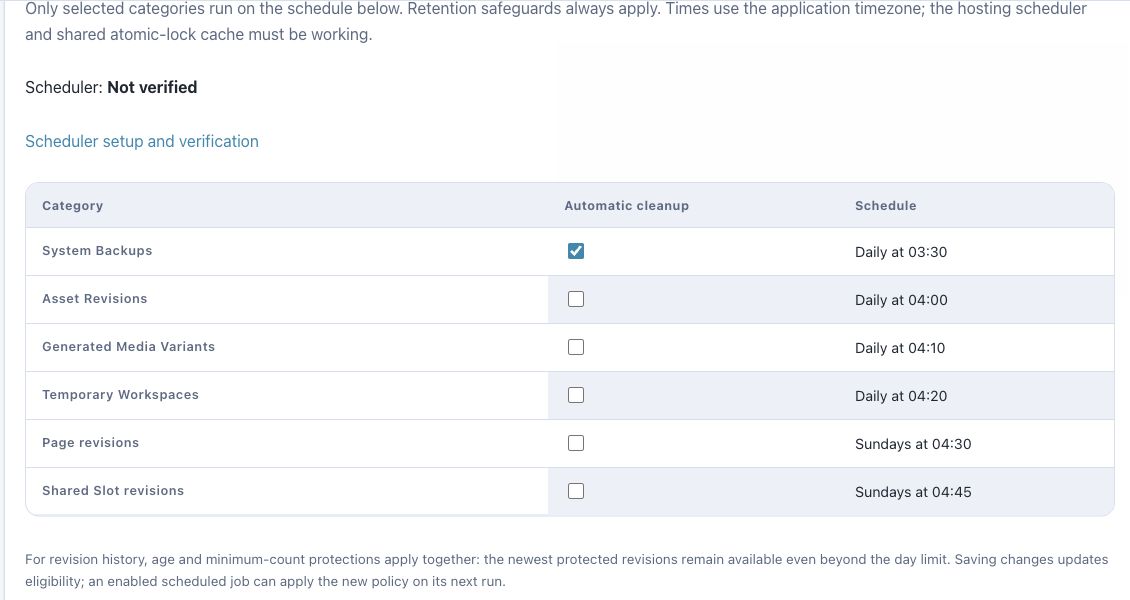
Variant cleanup preserves original Media Library files and current variant fingerprints. Revision cleanup combines an age threshold with a minimum count. For example, a page with only 20 revisions keeps all of them under a policy protecting the latest 50, even when they are old. Transfer archives and logs remain operator managed.
Check when the report and scheduler last ran
Dashboard, Backups and Cleanup display the last completed maintenance report and its measurement time. An old report is marked stale; opening the screen does not synchronously rebuild it. Refresh checks or the scheduler can refresh the measurements. Cleanup and restore still perform current safety checks before acting.
The Scheduler setup and verification screen shows installation-specific setup instructions and recorded activity. Adding a cron entry establishes a configuration; a recorded heartbeat is evidence that scheduled work actually ran. Each enabled cleanup category still follows its own schedule.
For Northstar, the next useful step is to inspect the current retention reasons, preview eligible cleanup, verify scheduling and review the resulting outcome. The operations documentation explains the controls and their limits. Disk usage may remain above the desired level when recovery safeguards require keeping files; that is an operational decision the report should make visible.
Screenshots use fictional Northstar Studio fixtures in published CMS 1.107.2. They show controls and example states, not a production recovery or cleanup operation.
Was this article useful?
Rate it or share a suggestion below.
Comments and suggestions
Comments are reviewed before they appear.
Comments
0No approved comments yet.
Leave a comment